Tuesday, May 24, 2011

Where is the Amazon Kindle App Store?

Amazon has built a beautiful app store for Android, a device (type) which they don’t (yet) offer. So you think surely the app store for the Kindle which they do offer exclusively is amazing, right? No such luck. There literally is no app store for Kindle. In fact you can’t even search or browse to a complete list of the apps available.

Don’t worry, there are a couple of ways to list at least some of the apps:

http://www.amazon.com/gp/bestsellers/digital-text/2534114011/
(Try to find that link anywhere on Amazon’s site!)

And an even skimpier list can be found as follows:
Start at the Amazon home page. Choose "Kindle" then "Kindle Store", from the "Shop All Departments" link (top left). Then choose "Games & Active Content" from the end of the line of text under all the top headers.

P i t i f u l!

Wednesday, May 18, 2011

Garmin Mobile 10 GPS receiver no-go on iPad 2

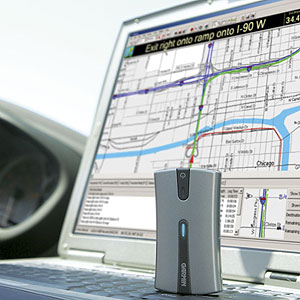
I have a Garmin Mobile 10 GPS receiver from 2007 kicking around that I used to use with Windows Mobile. It’s not a GPS like the one you use in your car. It has no maps or even a software or a screen for viewing location. It simply connects to GPS satellites and passes the information back to a user’s device over Bluetooth.

https://static.garmincdn.com/en/products/010-00579-00/g/cf-lg.jpg

https://buy.garmin.com/shop/shop.do?pID=420

My version 1 iPad had GPS built right in. You got that option only if you picked a model that had the AT&T 3G functionality. Which is kinda weird because I never turned the 3G on the whole time I had it, and the GPS always worked fine without it (over WIFI/Mifi).

When I got an iPad 2 I decided to forego 3G (and thus internal GPS) as I never ended up using the 3G on the first one. I decided I could live without the “big-screen” GPS.

Not long ago I ran across some indications on the web that the iPad actually supported Bluetooth GPS. This was possible before with jail-breaking but I wasn’t interested in that. But there are actually 3 bluetooth GPS receivers that seem to work with the iPad:

There’s some good info on all 3 here:

 http://aviationmentor.blogspot.com/2011/02/gns-5870-bluetooth-gps-for-ipad.html

However all references also mention an Apple certification program.  I can’t find any information about the certification program on Apple’s site, but I did find a document listing bluetooth profiles supported:

http://support.apple.com/kb/HT3647

Since I had the iPad 2 without GPS and I had the Garmin 10, I thought it wouldn’t hurt to try and see if they could connect over Bluetooth. It’s not clear to me if the built-in “Maps” app could actually use the Bluetooth GPS, but I could at least see if I could get the Bluetooth pairing to happen, then worry about map software later. Unfortunately they do not pair. I tried various resetting and rebooting options, and nothing helped. I’ve used the Garmin 10 with multiple devices in the past including phones and laptops and PDAs, so I know it is somewhat complaint with the Bluetooth spec. Thus I’m guessing that Apple is the villain here, and the certification involves proprietary extras. Bummer. But I thought I would post it here to help others avoid wasting time or money on this. And hopefully if something changes or somebody finds a way around the issues (which doesn’t involve jail-breaking) I’ll hear about it as well.

Friday, May 6, 2011

iTunes goes green

Seems like today, for the first time, iTunes recognizes that I have multiple devices of the same type that would presumably take the same big honking OS update. I downloaded the most recent iOS update for one iPhone, and when went to update the second device (which is the same version of hardware) iTunes skipped the download and went right into extraction. Never happened before (and I’ve been watching for it). Way to conserve global bandwidth Apple, which must somehow save some oil and greenhouse gases somewhere, right?

Tuesday, May 3, 2011

Firefox won’t run, Ubuntu 11.04 Natty Narwhal

https://bugs.launchpad.net/ubuntu/+source/unity/+bug/762202

If you are running the version of Ubuntu that just came out with Unity replacing Gnome, and can’t get Firefox to run from the new launcher, check out the link above with goes to an Ubuntu bug report. The workaround is to press Alt+F2 and type in firefox. This worked for me.

Friday, April 29, 2011

Amazon AWS EC2 cloud failure

Amazon has finally published it’s write-up of the outage that occurred starting 4/21/2011 - http://aws.amazon.com/message/65648 .

Honestly I have to hand it to Amazon for single-handedly creating the cloud-computing race. Remember they were an online store, not a datacenter hosting company. They have to be the healthiest company around in terms of constantly improving, expanding, driving into and inventing new products and markets.

But I want to challenge them here. They’ve made something where there was nothing. But I don’t think they have gone far enough yet in cloud computing in terms of offering server computing as a service. I think they owe it to their customers to make some more of this complexity disappear. I’m talking about geographic fault tolerance. I can’t believe in this day and age companies still think they can bet their business on single-site deployments, no matter what kind of clustering and zoning is in place. Amazon needs to take over another layer of the stack here, and make global load-balancing automatic and standard, just build it in to everything.

Sure it’s hard. But right now Amazon is asking the customer to do that hard thing as a one-off baked into their application infrastructure design. Imagine the world-wide cost savings if Amazon does it once, and bakes it into it’s services. Sure the little guy doesn’t want to pay for it. But Amazon ask yourself if you want to have to write another letter like this. And maybe enough big guys will come sniffing around once you add it to the sales literature, to offset those admittedly significant development and ongoing increased resource utilization costs.

Wednesday, April 27, 2011

UPS pulls an Amazon

Got this message for a package I am tracking today, “Due to severe thunderstorms in Louisville, KY (our major air hub), UPS Next Day Air Early A.M., UPS Next Day Air, and International Express delivery times will be delayed today” … “ for delivery throughout the United States.”

Folks that’s called a single point of failure. That’s called a lack of redundancy, and it’s called no geographical fault tolerance.

It’s just like Amazon last week, got all these poor websites run through a single datacenter. C’mon we knew better than that a decade ago.

Spend the money, have two or three. It’s not optional. Do it right, make them hot-hot.

Thursday, April 21, 2011

Tablets = Convenience

Dunno why this never occurred to me before. I guess I spend so much time trying to push the characterization that tablets are  “content consumption devices” rather than content creation devices down everyone’s throat that the simpler truth got by me.

What I mean is, there’s not a single thing you do on a tablet (consuming all that content) that you can’t do on both your PC and your smartphone. So why do we need the tablet? It fits in a convenience niche. Where the smartphone is a little too small, and the laptop a little too unwieldy, and the e-ink device a little too single-purpose, that’s where the tablet comes in.

You’re in the kitchen using it for recipes, then you carry it with you to the dining room where maybe you use it to read some newspapers with your food. Next it’s to the living room where you look up songs from your favorite TV show, or read the latest bestseller during commercials or even pull up a Netflix movie (with headphones) while the kids are watching Disney channel. In between all these things you’re keeping up with Facebook and Twitter and the latest news via the web.

There’s nothing the tablet does, that we don’t already have. But it make enough things easier and better, to create a value proposition that is selling millions of devices a year.

Tuesday, April 19, 2011

Watching multiple streams on Netflix

I did not know this, but it sounds like if you have the streaming only Netflix plan, you can only watch 1 stream at a time, whereas if you have a DVD plan, you can watch as many streams as the number of DVDs you can have out.

This becomes interesting if you have more than 1 way to watch Netflix streams. For instance the kids can watch a Netflix movie on the TV via the Wii, while Mom watches a Netflix TV show on the iPad in the bedroom. Meanwhile Dad watches a Netflix movie on his iPhone while traveling for business, all at the same time.

http://gigaom.com/video/netflix-multiple-streams-family-plans/

Wednesday, April 6, 2011

Sync-able iOS savegames

Anybody else out there have an iphone and an ipad? How cool is it to start reading a book on Amazon's Kindle app on the iPad in your living room, and then pick back up on the page you were on, from your iPhone, later while standing in line at the grocery store? It's awesome!

How annoying and aggravating it is then, to make some serious progress in Angry Birds or some other great i-game, but then to be unable to continue the same session on your other device?


Thursday, March 17, 2011

Upgrade Netbook Hard Drive

The controller (?) appears to have went south in the 160GB 5400 Seagate in one of the Asus EEE-PC 1005HA netbooks in my house. After a lot of troubleshooting I reluctantly decided to upgrade the hard drive to a 200GB 7200 Seagate I happen to have on hand, that I really had another use for. Oh well, at least I have it to use.

Now I upgraded the memory in these netbooks when I got them, and it was no big deal. Take the plate off the bottom replace the board boom done. I’ve also done lots of other hard drive replacements in laptops, and it is usually essentially the same deal, pop off the cover, a couple of screws maybe a ribbon cable, 5 minutes tops.

A netbook hard drive is a whole ‘nother ball of wax unfortunately. They aren’t meant to be end-user replaceable. There’s no little door! The operation reminded me a lot more of the time I spilled soda into a tiny Dell laptop I had, and I took the whole machine apart, every component separated from the motherboard, and various skeletons of the laptop all separated, to dry. Also it reminded me of the game, “Operation”!

Here’s a couple of resources that helped for this particular netbook, and I’m sure to a certain extent other EEE’s and other netbooks:

At this point (reinstalling Windows) the operation appears  to be a success, so a story with a happy ending rather than a cautionary tale. How nice!